


FreePrints Photo Art
4.8339.00 Reviews
App Specs
- Version
- 2.12.4
- Updated On
- License
- Free
- Downloads
- 500,000+
- Developer
- PlanetArt
- Categories
- Photography
- Platform
- Android
Screenshots
 Analysis by AppCompare
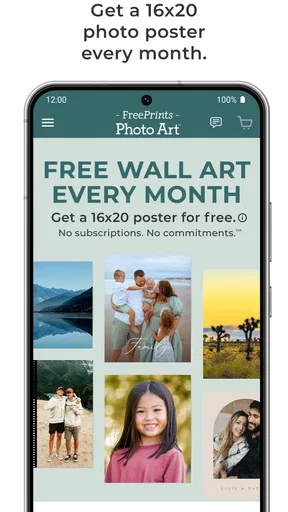
I like the idea behind FreePrints Photo Art: it makes turning a phone photo into something you can hang at home feel approachable, rather than like a project that requires design software or a trip to a print shop. The strongest reason to try it is the monthly free photo poster offer, with no subscription. That makes it an appealing starting point for people who want to put a favorite image on their wall without committing to a regular plan. My main reservation is that “free” is only one part of the decision: choosing a format, preparing a suitable image, and checking the full order details still matter if you want a print you’ll be happy to display.
What the monthly poster offer is good for
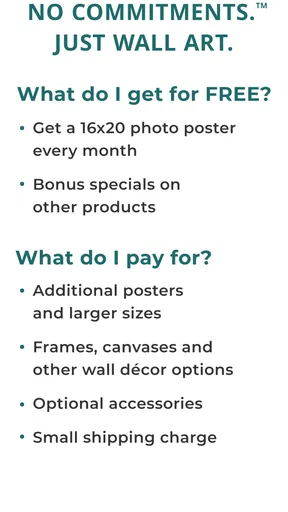
A free poster is especially useful when you already have a photo in mind but are unsure whether you want to spend money on a larger or more elaborate wall piece. I’d use the offer for a casual print, a seasonal picture, or a first attempt at decorating a small area. It gives you a practical way to see how a photo works as wall art before making a bigger commitment. Since there’s no subscription, it doesn’t ask you to sign up for an ongoing plan just to take advantage of that offer.
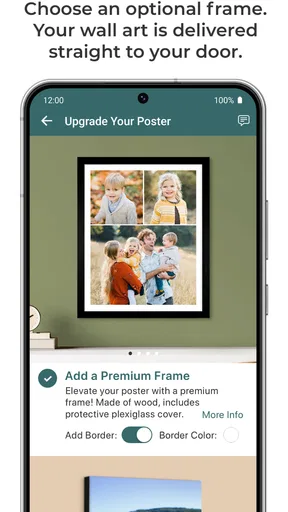
I would still approach the checkout as carefully as I would with any photo-printing service. Before placing an order, review the selected product and the total shown there, rather than assuming every choice or delivery detail is covered by the free poster offer. The useful distinction is between the poster promotion and the wider range of possible print choices: if you move beyond the offer, make the decision based on the item you actually want, not on the word “free.”
Choosing an image that will work on a wall
The biggest difference between a photo that looks good on a phone and one that feels right as wall art is how it reads at a distance. A picture can seem sharp on a small screen but feel crowded when enlarged, especially if the main subject sits close to the edge. I’d check the crop carefully and leave enough visual breathing room around faces, pets, or other details you don’t want trimmed away. This is a more useful step than applying a filter just because it is available.
For a family photo, I’d favor a frame where everyone’s face is easy to see and avoid a crop that cuts through heads or hands. For a landscape, a wide composition may suit a poster better than a tightly cropped detail. If the source image is dim or already soft, a large print can make those flaws more noticeable; I’d choose another shot rather than expecting editing controls to restore detail that was never captured. These small checks help prevent the familiar disappointment of a print that looked fine in the order preview but doesn’t feel balanced on the wall.
When a different approach makes more sense
This app is aimed at people who want a straightforward path from a personal photo to a physical print. If your goal is to make a carefully coordinated gallery wall, you may prefer to plan the sizes, color palette, and spacing first, then order from whichever service gives you the exact products and presentation you need. Likewise, someone who wants to edit an image extensively should do that in a dedicated photo editor before ordering. A print-ordering app is most useful when the photo is already close to how you want it to look.
For a quick gift, the monthly poster offer could be a convenient prompt to print a picture that might otherwise stay buried in a camera roll. For a time-sensitive present, though, I would not rely on a general expectation of fast delivery; I’d check the current order information and leave room for delays. And if the recipient has a specific taste in materials or decor, a standard poster may be less suitable than choosing a format together.
Worth Reading Before You Choose

EA SPORTS FC Mobile 26 Is a Bigger Football Game, but It Takes Time

Flipboard Shows What News Apps Must Do Beyond the Feed

Switching to Android Auto Means Rethinking Your Driving Routine

Google Calendar Makes a Crowded Week Easier to Manage

Ludo King Makes the Most of the Minutes Between Plans

Baby Panda World Brings Quick Play to Modern Phones, but Its Game Library Feels Busy
FreePrints Photo Art is a photography app from PlanetArt. It is free to install, is rated for Everyone, and has a 4.7 average from around 6,400 ratings. It has over 500,000 installs, and version 2.10.8 lists Android 10 as its minimum operating system. Those figures suggest a well-used option, but they are not a substitute for deciding whether its offer and print choices fit your own needs.
Hey there, photo enthusiasts! Have you ever wanted to turn your favorite pics into stunning artwork without breaking the bank? Well, let me introduce you to FreePrints Photo Art. I’ve been playing around with this app for a while now, and I'm excited to share my thoughts with you.
Turning Memories into Masterpieces
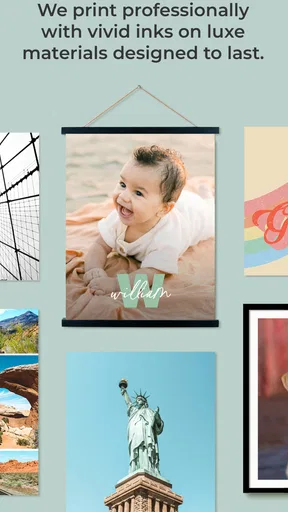
So, what exactly is FreePrints Photo Art? In a nutshell, it's an app that lets you transform your photos into canvas prints, metal prints, and more. Seriously, I was blown away by the variety of options available. Whether it’s a cherished family portrait or a breathtaking landscape, you can bring it to life with just a few taps.
Getting Started
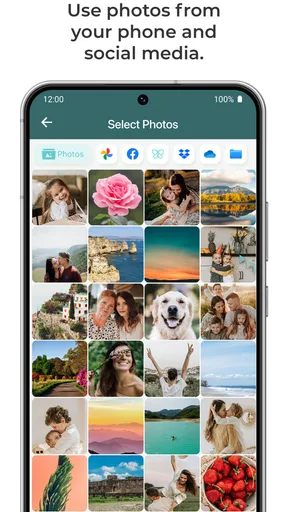
Diving into the app is a breeze. Once you download it from the App Store or Google Play, the user-friendly interface guides you through the process. It's like having a personal art studio in your pocket! Just select a photo from your gallery, choose your desired format, and voila—you're on your way to creating a piece of art.
The app offers a ton of customization features. You can crop your photos, adjust the brightness, and apply filters to get that perfect look. I spent a good amount of time tweaking my images to make sure they looked just right. Trust me, it's worth the effort!
The Variety of Options
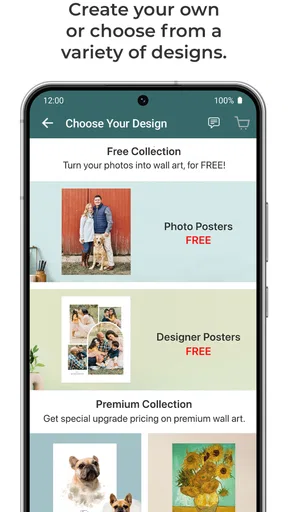
The range of products you can create is seriously impressive. FreePrints Photo Art offers canvas prints, metal prints, acrylic prints, and even wood prints. Each option has its own unique charm. I personally love the classic feel of a canvas print, but the sleek look of metal prints is also hard to resist. There’s something for everyone, whether you’re into modern aesthetics or prefer a more traditional vibe.
If you're like me and struggle with decision-making, don’t worry! The app provides previews of how your photo will look on each material, making it easier to choose. Plus, the pricing is super transparent, so you won't encounter any surprise fees at checkout.
Quality and Delivery
Alright, let's talk about quality. I was a bit skeptical at first, but the prints I ordered turned out to be top-notch. The colors were vibrant, and the details were crisp. It’s clear that they take pride in delivering high-quality products.
As for delivery, the app promises quick turnaround times. My order arrived faster than I expected, and everything was packaged securely, ensuring that my prints were in perfect condition. It’s a relief knowing that you can trust them to handle your memories with care.
Why You Should Try It
Honestly, if you’re looking for an easy and affordable way to decorate your space with personal touches, give FreePrints Photo Art a shot. The convenience of ordering directly from your phone is unbeatable. Plus, there's something incredibly satisfying about seeing your photos transformed into beautiful, tangible art pieces.
If you're ready to get creative, download the app and start exploring. Who knows? You might discover a newfound passion for photo art!
All in all, FreePrints Photo Art makes it simple to turn your favorite photos into stunning artwork. Whether you're gifting a print to a loved one or sprucing up your home, this app has you covered. Happy printing!
Making the most of the first order
I’d treat the first order as a small test rather than trying to solve every decorating decision at once. Pick one image that matters to you, check the framing in the preview, and compare how the same picture feels across the available materials. A close-up portrait may feel warm on canvas, while a graphic image with strong shapes might suit a smoother, more contemporary surface. The preview is helpful for imagining the finish, but it cannot tell you how a print will look under the lighting in your room, so think about where it will hang before choosing.
One practical workflow is to shortlist two or three photos before opening the order flow. That keeps you from settling for the first image you see in your gallery simply because it is convenient. Look for a clear subject, a crop that leaves comfortable margins, and colors that won’t clash with the wall or furniture nearby. If you are printing a picture with several people in it, check that faces remain legible at the selected size rather than relying on the thumbnail alone.
Personal gifts and everyday decorating
The app makes the most sense when the photo itself is the point of the gift. A picture from a shared trip, a pet portrait, or a family moment can feel more personal than a generic decorative print, and the phone-based process lowers the barrier to getting it made. I’d use it for a thoughtful, informal present when there is enough time to place the order and the recipient would enjoy choosing a place for it. For a formal occasion or a very particular interior, I’d first confirm that the available product and finish match the brief.
For home use, think about the wall before the image. A single print can work as a focal point, but a group of pictures needs more planning: keep the images visually related, consider whether their crops will sit comfortably together, and decide on spacing before ordering. This is where an app built around individual photo products may be less convenient than a service or local print shop that lets you plan a whole arrangement in one go. FreePrints Photo Art is better for turning a chosen image into a personal object than for designing an entire room scheme.
What to expect from the ordering experience
People often wonder whether they need special photography skills to use a service like this. In my view, no: the useful decisions are basic ones—choose a reasonably clear source image, check the crop, and avoid over-editing. Brightness adjustments can help a photo that is slightly dark, but pushing them too far may flatten contrast or make skin tones look unnatural. Filters can set a mood, yet I’d compare the edited version with the original before ordering, especially for a picture you want to keep looking believable.
Another sensible question is whether the free monthly poster means every order will be free. I would not read it that way. The offer is a reason to consider the app, while other formats and choices should be evaluated on their own terms. Check the final order details each time, including what item is selected and the total before confirming. That habit is more reliable than assuming the promotion applies to a different product or that a preview reflects every part of the purchase.
And what if a print does not suit the room once it arrives? That is why I’d start with an image and format I’m comfortable living with, rather than ordering several experimental pieces at once. A poster is an easy way to try a personal image on the wall; more distinctive materials make sense when you already know the photo and presentation are right. For a permanent display, consider whether the image has enough resolution and whether its colors work with the space in both daylight and evening light.
Who will appreciate it most
FreePrints Photo Art is a good fit for someone who takes plenty of pictures on a phone, wants a low-effort route to a physical print, and enjoys making personal touches at home. It also suits people who would rather start with one meaningful picture than learn a complicated design tool. The free monthly poster is particularly appealing if you like the idea of printing regularly but do not want a subscription tying you to a schedule.
I’d steer away from it if your priority is a highly controlled professional print workflow, extensive image retouching, or a carefully specified set of sizes and materials for a coordinated installation. In those cases, a specialist printer, a dedicated editor, or a local shop may give you more control and a chance to discuss the result before committing. That isn’t a knock on the app; it is simply a difference in purpose. Its strength is convenience and a personal-photo focus, not replacing every tool involved in serious print production.
A considered recommendation
The app’s appeal is straightforward: it helps bridge the gap between photos that stay on a screen and images you can actually put in your home. Its product variety and editing basics make it approachable, while the monthly poster offer gives newcomers a reason to try printing without signing up for an ongoing plan. The most satisfying results still depend on your choices, particularly the source image, crop, and material, so a little care before checkout pays off.
For me, this is worth trying if you want a simple way to turn a favorite phone photo into wall art and are happy to review the order details as you go. I would not choose it when exact professional specifications or a tightly coordinated gallery display matter more than convenience. For everyone else, start with one image you genuinely like, use the preview to compare finishes, and let the picture—not the promotion—decide whether it deserves a place on your wall.
Pros
- Easy to use interface for all users.
- High-quality print options available.
- Fast delivery to your doorstep.
- Wide range of customizable products.
- Affordable pricing for prints.
Cons
- Limited editing tools within app.
- Occasional delivery delays reported.
- Requires strong internet connection.
- Some features locked behind paywall.
- Lacks integration with certain cloud services.
FAQs for FreePrints Photo Art
What is FreePrints Photo Art and how does it work?
FreePrints Photo Art is an app that allows users to transform their digital photos into stunning art prints. You can choose from a variety of styles and sizes, and the app provides easy-to-use tools to customize your photos. Once you're satisfied, you can order prints directly from the app, which are then delivered to your doorstep.
Is FreePrints Photo Art free to use?
The app itself is free to download and use. It offers basic editing and customization features at no cost. However, there are charges for ordering prints, which vary depending on the size and type of print you choose. Occasionally, the app offers promotions and discounts, so keep an eye out for deals.
What types of prints can I order through FreePrints Photo Art?
FreePrints Photo Art offers a wide range of print options, including canvas, metal, and acrylic prints. Each type comes in various sizes to fit your needs. The app provides detailed previews of how your photo will look in each format, helping you choose the perfect style for your art piece.
How is the quality of the prints from FreePrints Photo Art?
The prints from FreePrints Photo Art are known for their high quality. The app uses professional-grade materials and advanced printing techniques to ensure vibrant colors and sharp details in every print. Customer reviews often highlight the impressive quality, making it a popular choice for turning digital photos into art.
Does FreePrints Photo Art offer customer support?
Yes, FreePrints Photo Art provides customer support to assist with any issues or inquiries. You can contact their support team via the app or the website. They are known for being responsive and helpful, ensuring a smooth experience from ordering to delivery. Additionally, their FAQ section addresses common questions and troubleshooting tips.


